# Highlights
"There's only one way to do it" (TOOWTDI) - If you remember Python's motto
during the Perl wars. In a similar vein, Deft takes that idea and extends it
from the language to the UX - whether text (ansi) or graphical (gl) TOOWTDI. In
the same way Bun.js is a fully integrated environment for webdev, Deft supplies
a full ecosystem to write code in without external tools.
Emacs is the progenitor of these ideas, a fully integrated experience;
substitute Deft for Lisp, a single thread for multiple independent thread apps
that can cooperate.
An example of a retro workspace below ...
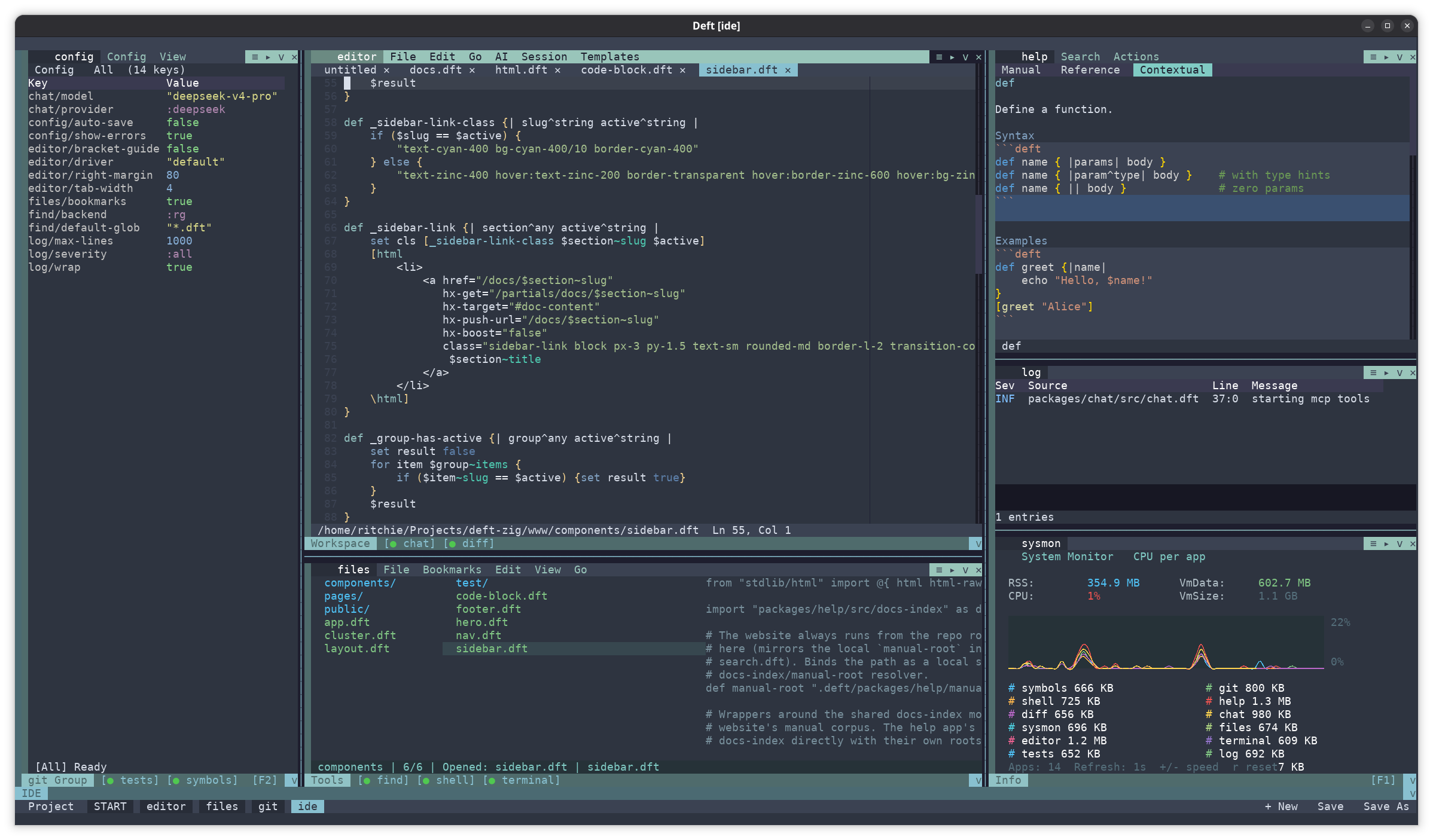 Deft is an environment that you code in AND deliver your apps in.
## Integration
Integration is the key word. Every app or runtime can specify functions which
are globally registered and it's easy ...
Deft is an environment that you code in AND deliver your apps in.
## Integration
Integration is the key word. Every app or runtime can specify functions which
are globally registered and it's easy ...
def hello { | name |
    @rpc
    "hello $name"
}

# the @rpc is all you need, then you can call it with

[rpc "myappinstance" "hello" "ritchie"]
Why is this powerful? When you integrate the sheets app (spreadsheet) with the
BTC app in the same workspace, the sheet can query the current BTC price
directly.
In addition, there's a pubsub mechanism, e.g. the editor fires a message when it
opens a file, the file manager listens for it and syncs the directory to the
given file, simultaneously the symbols manager loads the parsed symbols from the
editor and displays them. As the user types code in the shell or the editor they
publish message of the current word and the help apps contextual tab displays
help for the current symbol. We can now begin to imagine multiple 3rd party apps
interacting in rich ways that the authors did not expect.
# to publish from any deft app ...

[pub/publish "my-event" %{...some details}]

# in some sink

[pub/subscribe "my-event" some-closure]
What this means is loosely coupled units of functionality making a larger app.
Each running independently with their own interpreters, threads and memory.
To sum up, you have a full platform to develop loosely coupled applications,
which can be easily added to and modified. In addition here's the standard
launcher
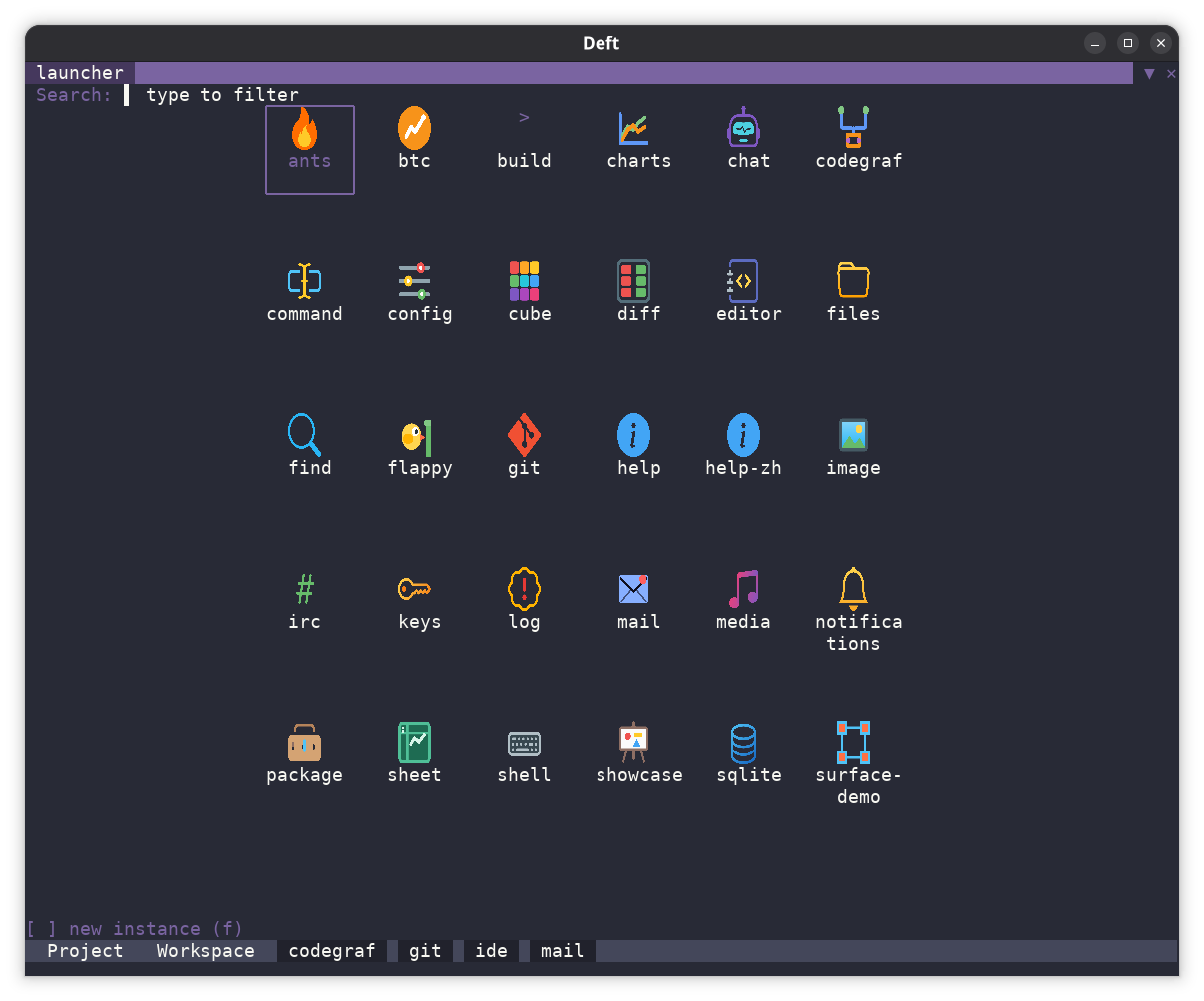 The launcher can be replaced by your launcher. So imagine a suite of tools for
your application, with your own launcher design.
### Debugger
Integration is not just skin deep, you can debug any panel or runtime, or access
them via the shell ...
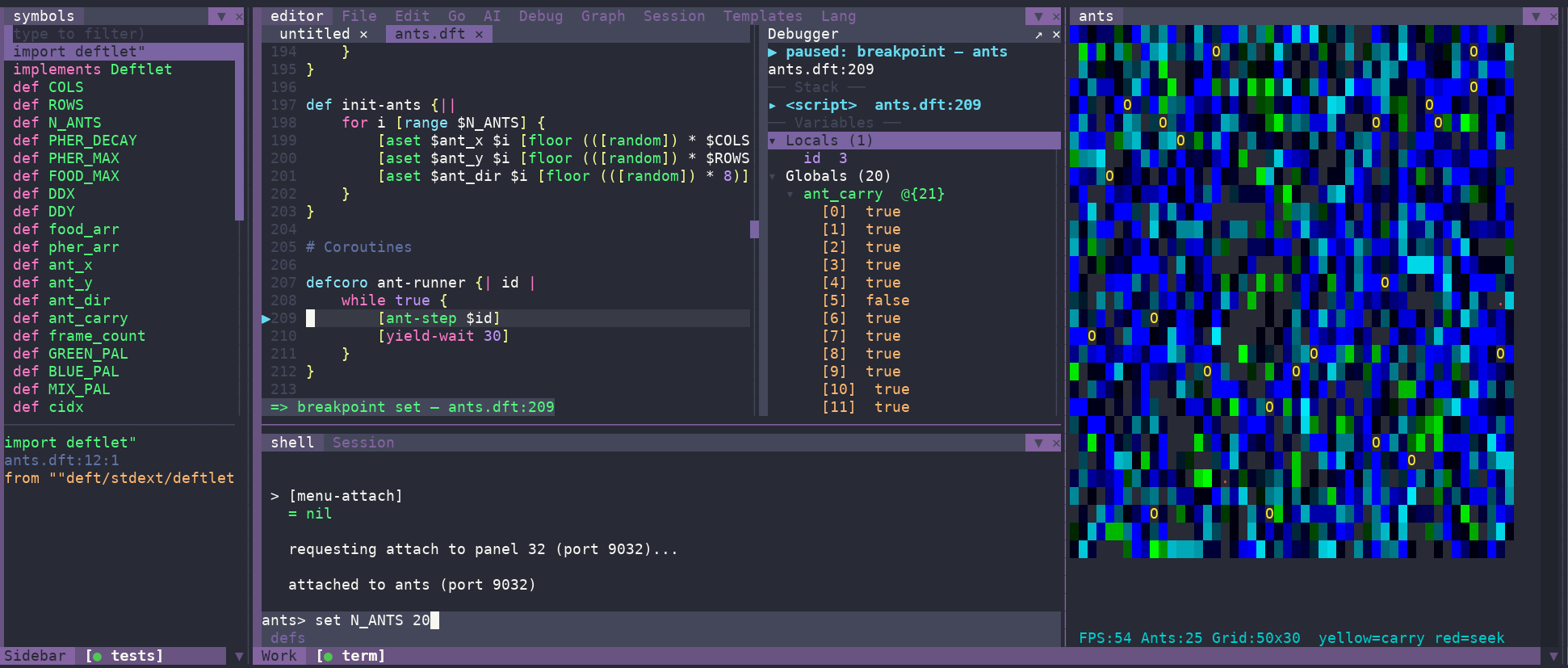 Simply "Session/Attach Panel" from the editor or shell menus to debug.
## Flexability
There are 3 main hosts;
### deft (scripting, 38MB*)
deft on the server allows you to run networked applications, built in
valkey/sqlite and postresql enable common use cases. Note: Deft currently
provides most of the Bun.js (non web functionality) sans S3/mysql which is
currently sitting at 78MB. retro/retra inherit all the functionality of the
base.
Deft has a built in app server with middleware, components, SSE and websockets.
Deft app server serves this site with Deft component templating and HTMX.
The launcher can be replaced by your launcher. So imagine a suite of tools for
your application, with your own launcher design.
### Debugger
Integration is not just skin deep, you can debug any panel or runtime, or access
them via the shell ...
Simply "Session/Attach Panel" from the editor or shell menus to debug.
## Flexability
There are 3 main hosts;
### deft (scripting, 38MB*)
deft on the server allows you to run networked applications, built in
valkey/sqlite and postresql enable common use cases. Note: Deft currently
provides most of the Bun.js (non web functionality) sans S3/mysql which is
currently sitting at 78MB. retro/retra inherit all the functionality of the
base.
Deft has a built in app server with middleware, components, SSE and websockets.
Deft app server serves this site with Deft component templating and HTMX.
def status-sidebar {| active^string |
    set groups [status-groups]
    [html
        <aside class="w-64 shrink-0 hidden lg:block">
            <nav class="sticky top-20 max-h-screen-nav overflow-y-auto pr-4 pb-8">
                <h3 class="text-xs font-semibold uppercase tracking-wider text-zinc-500 mb-3 px-3">Status</h3>
                <div class="space-y-2">
                    [for group $groups {
                        [html
                            <details [if [_group-has-active $group $active] "open" ""] class="group/status rounded-md">
                                <summary class="list-none cursor-pointer px-3 py-1.5 text-xs font-semibold uppercase tracking-wider text-zinc-300 hover:text-zinc-100 bg-zinc-800/40 border border-zinc-700/60 rounded-md transition-colors flex items-center justify-between">
                                    <span>$group~title</span>
                                    <svg class="w-3.5 h-3.5 text-zinc-400 transition-transform group-open/status:rotate-90" fill="none" stroke="currentColor" viewBox="0 0 24 24">
                                        <path stroke-linecap="round" stroke-linejoin="round" stroke-width="2" d="M9 5l7 7-7 7"/>
                                    </svg>
                                </summary>
                                <ul class="space-y-0.5 mt-1">
                                    [for section $group~items {
                                        [_sidebar-link $section $active]}]
                                </ul>
                            </details>
                        \html]}]
                </div>
            </nav>
        </aside>
    \html]
}
### retra (ansi based, 45MB*)
Here is ansi retra running the IDE ...
When you're working on a remote server, retra can give you a development
environment, identical to retro, but with graphics downgraded appropriately, but
a full editor with a decent vi mode, integrated shell, test runners, easy system
integration.
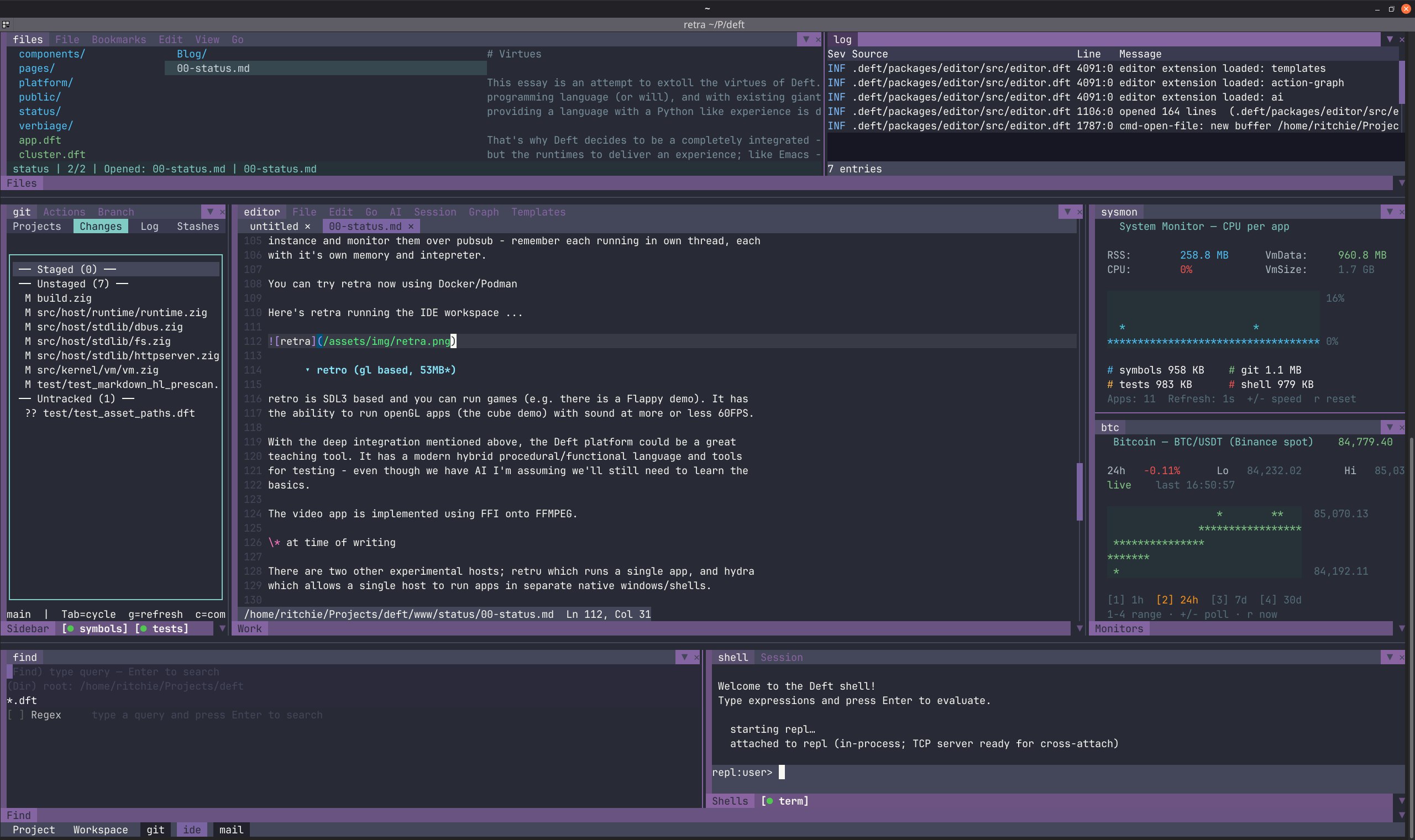 Imagine then as a sysadmin, adding your own panels to your app with an event
driven and declarative UI. Deft is very good for management panels, particularly
when you can drive multiple servers from different runtimes in the same deft
instance and monitor them over pubsub - remember each running in own thread,
each with it's own memory and interpreter. I've tried this out here ...
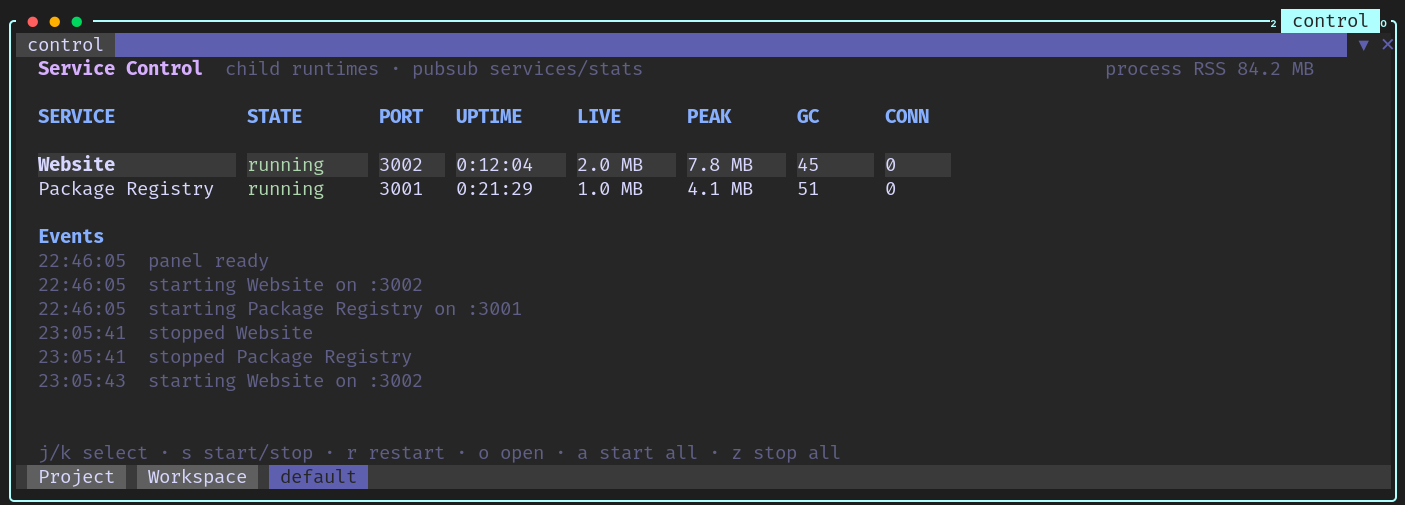 Above is the deft website and package manager running as child processes to a
parent control panel rendered in retra over ssh (in tuios), I'm not saying this
is a great way to do server management as OS control is probably a better
option, but in testing mode it's an interesting experiment - of how a parent
runtime can take advantage of monitoring child runtimes.
### retro (gl based, 54MB*)
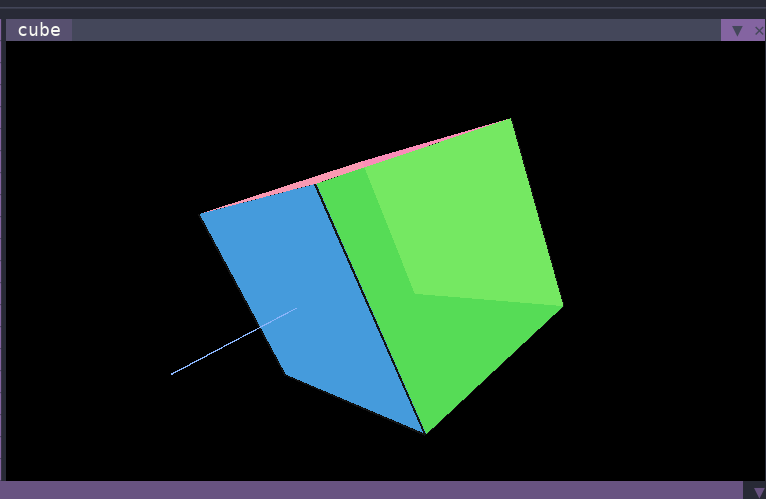
retro is SDL3 based and you can run games (e.g. there is a Flappy demo). It has
the ability to run openGL apps (the cube demo) with sound at more or less 60FPS.
With the deep integration mentioned above, the Deft platform could be a great
teaching tool. It has a modern hybrid procedural/functional language and tools
for testing - even though we have AI I'm assuming we'll still need to learn the
basics.
#### Retro Media
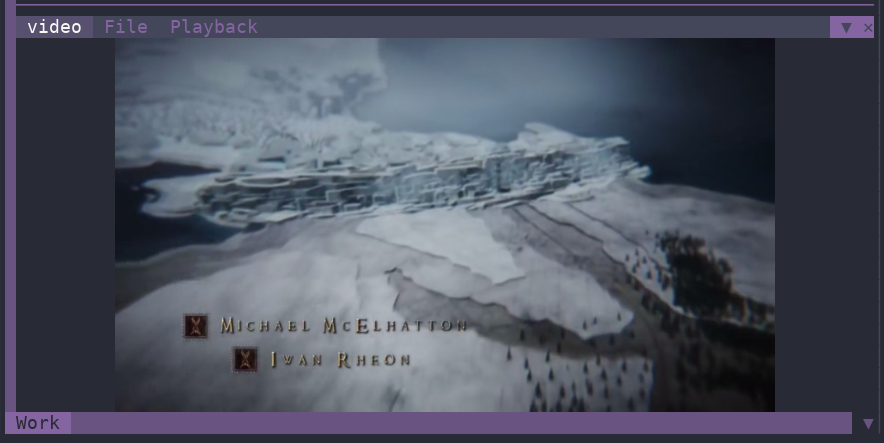
The video app is implemented using FFI onto FFMPEG.
| Video | OpenGL |
| ----- | ------ |
|
 |
 |
#### Other Experimental Hosts
There is another experimental host, hydra, which allows a single hydra instance
to run apps in separate native windows/shells - i was thinking of omarchy when
creating this.
\* at time of writing
### Workspaces, Menus and Pies
Both retro/retra UIs feature workspaces to allow you to shape multiple panel
layouts. Drag and drop panels and groups of panels into new positions. Build
your new workspace from any panel using keys strokes or (from the 3d world) the
pie menu to split the current panel horizontally or vertically.
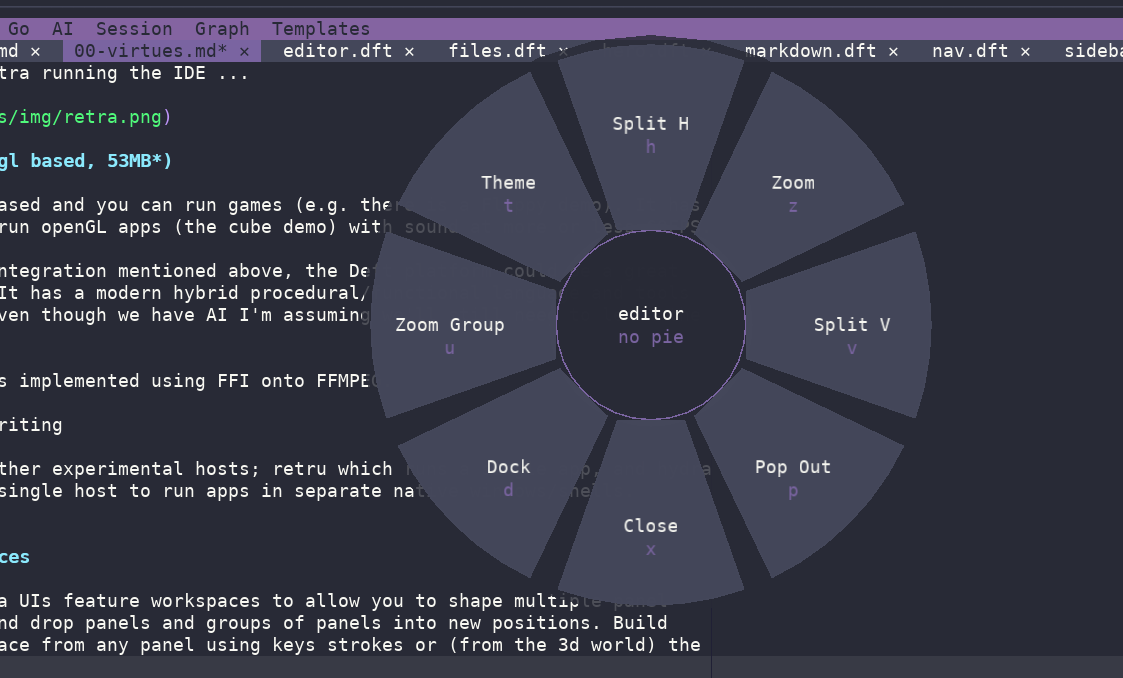 Menus and pies are defined in-app with a deft map.
#### Lockdown Mode
You may lock both retro/retra down to single panel apps, or certain workspace
configurations with varying degrees of workspace chrome.
## AI Generated Apps
Most of the Deft apps currently available were generated with AI. To be able to
create a new app in chat with "create an app with the following spec" and then
just load it and tweak it is a very useful feature. AI integration can be much
more pervasive in all apps going forward.
There is deep AI integration with providers as installable packages.
AI sessions are Sqlite backed.
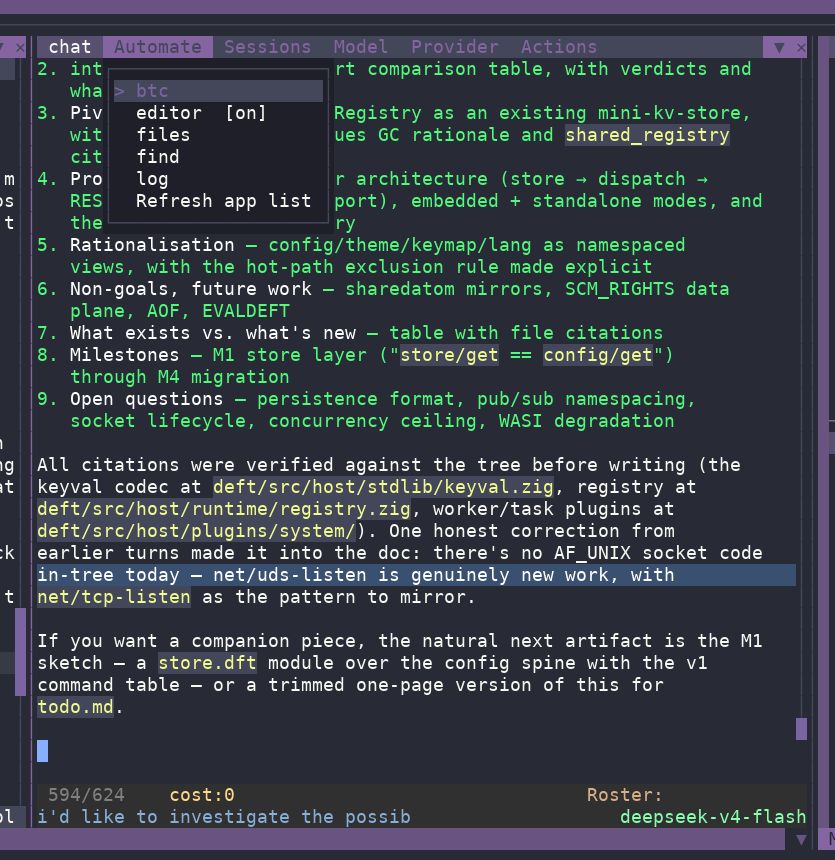
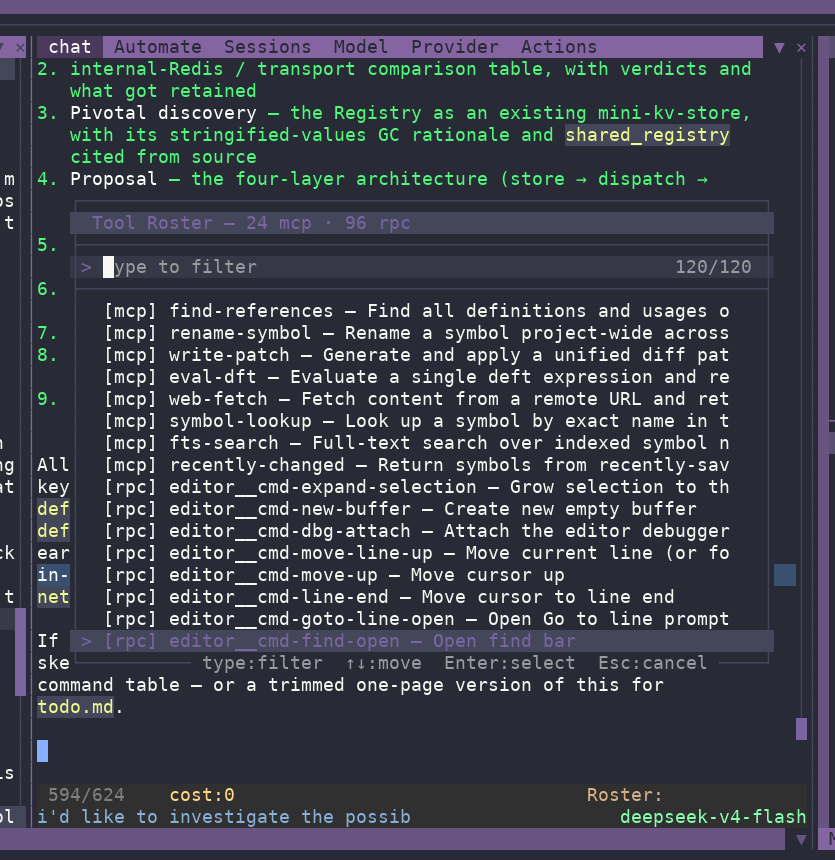
Deft is MCP aware, and further multiple app @rpc can be added to the MCP roster
on demand using the Automate menu option, switch on the editor automation, and
it appears in the MCP tool roster ...
| Editor Automation | Roster |
| ----------------- | ------ |
|
 |
 |
The chat app needs a lot more work, but is moving in the direction of Deepseek's
"Everything is a plugin".
#### Sandbox
Given potential security issues with AI, Deft also has landlock sandbox baked in
to limit AI reach to the current deft working directory and declarative access
specification for required directories.
## Full I18n
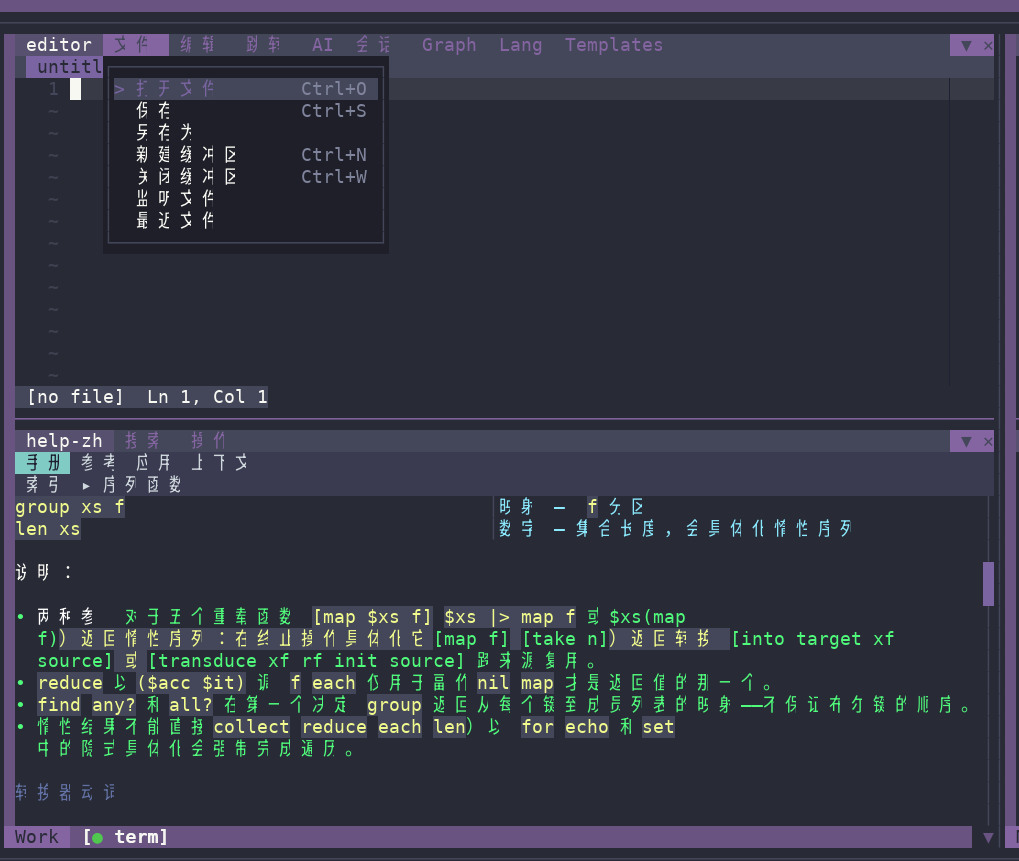 Deft comes with a lang/ namespace to aid i18n within apps.
## Commercial Considerations
### AOT Bytecode Compilation
deft compile --app flappy
Creates the following
flappy
├── assets
├── bundle.dft
├── flappy.dftc
├── icon.svg
└── package.dft
All code bundled into the byte compiled flappy.dftc - all assets bundled to
assets/ directory.
The launcher finds and runs the app identically to the source version.
See AOT Compilation for the full workflow — compiling,
launching images in each host, bundle manifests, and semantics/limits.
### Lockdown Mode
Pin the workspace to a vendor launcher and an allow listed app set, or
run one full-bleed app with the `:chrome :app` single-app
presentation. See Lockdown for more info.
## Future
### Network Config/Delivery
Workspace/configuration delivery over the network, .i.e. consistent environment
downloaded to hosts.
Use cases:
- a teaching environment
- point of sales terminals
Note: Deft already has an SSH VFS, so saving data back to user homes already
possible
### Full Platform Coverage
Currently just Linux/RPI. Given Zig is the implementation language, providing
Windows/Mac coverage should be relatively straightforward. I'm prefer to work on
covering the basics on my native platform (Linux) before venturing forth.
3rd party interest in given platforms will focus my attention.
### Experimental Apps
I'm currently playing with sheets a new take on the spreadsheet, and codegraf.
I'll concentrate on codegraf for now as it has more practical platform
implications. Typically these applications serve to test the underlying
subsystems robustness and performance.
#### Codegraf
Codegraf is effectively like Blender's geometry nodes, which have been an
incredible addition to that platform; visualise data flows through the system
performing transformations on them, effectively it's writing a script. It seems
superfluous when you can "just write the script" but in the Blender ecosystem
it's provided great utility for many users. In a similar way codegraf can enable
same for Deft - maybe as an introduction to programming, simple scripting and
so on.
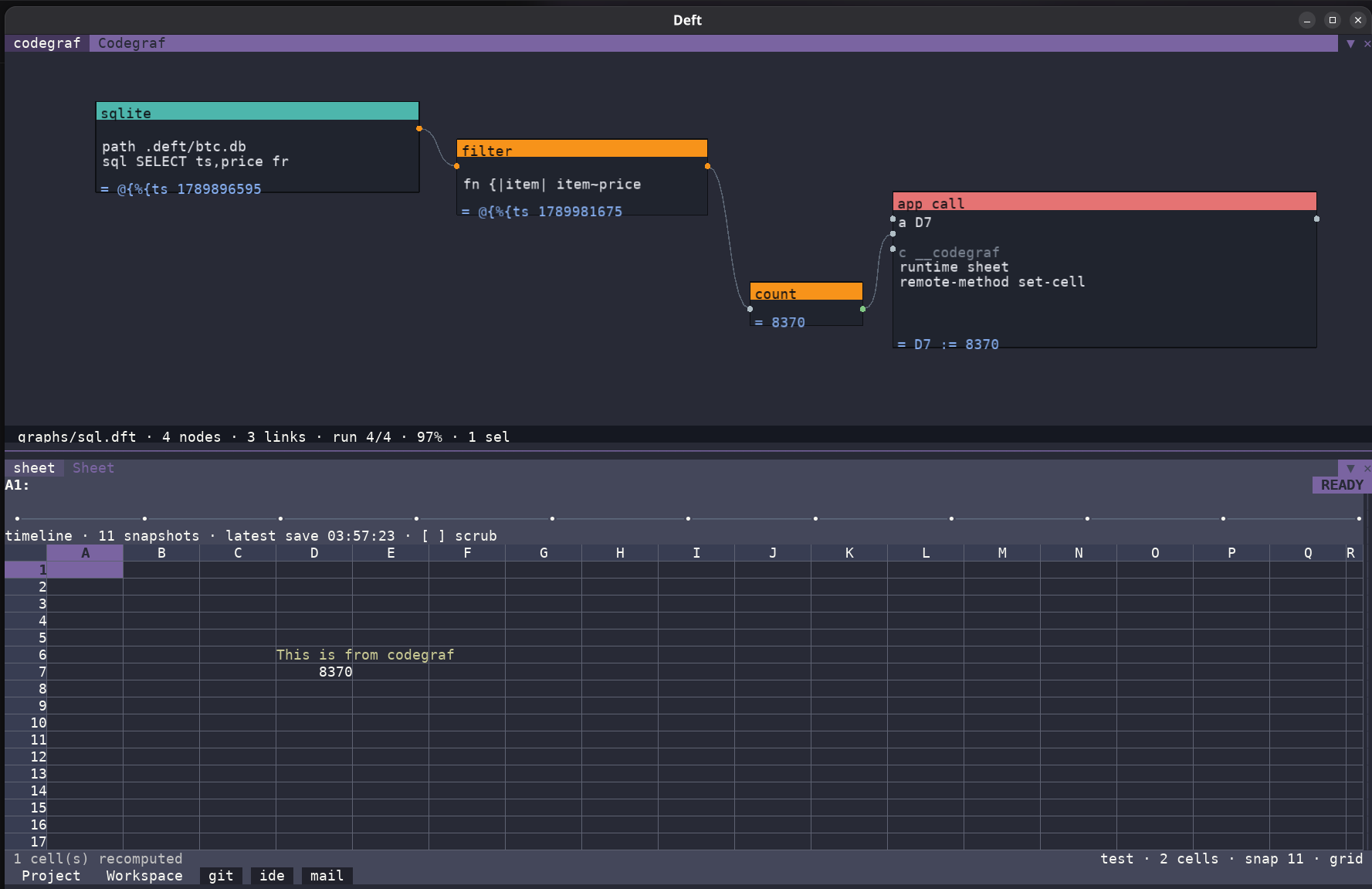 You can see we're running a sqlite query, filtering through a user defined
filter, counting the output of that list then inserting it into the sheet using
the sheets @rpc defined method set-cell. One can imagine libraries of these.
#### Email Client
In addition, I have a very early working prototype of an IMAP email client.
IMAP/SMTP implemented in Deft - again I'm mirroring Emacs style integration.
#### Other Network Clients
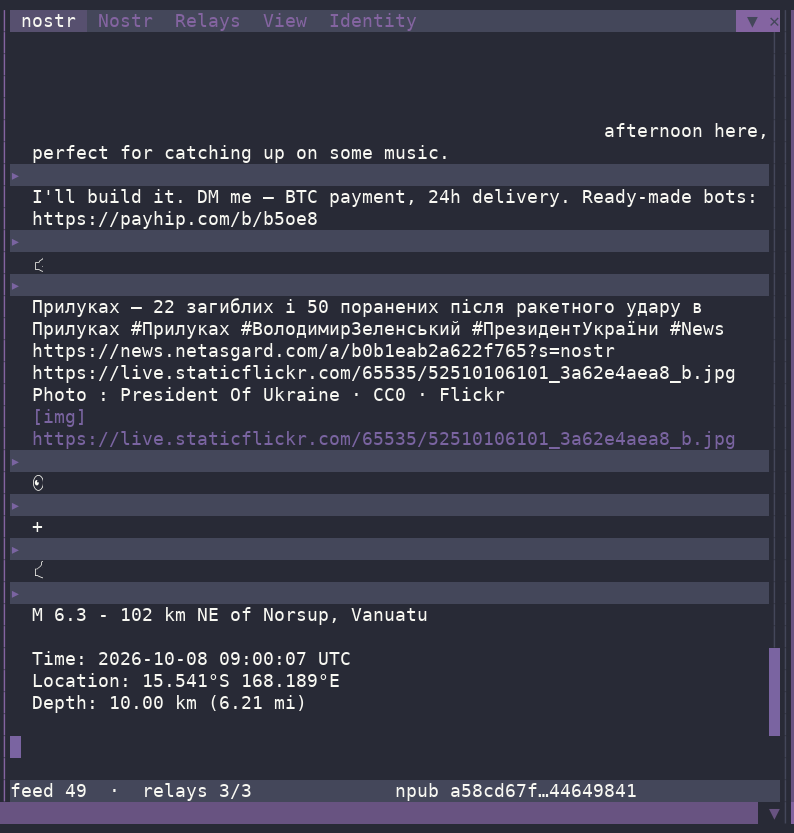
- Nostr is decentralised social media infrastructure.
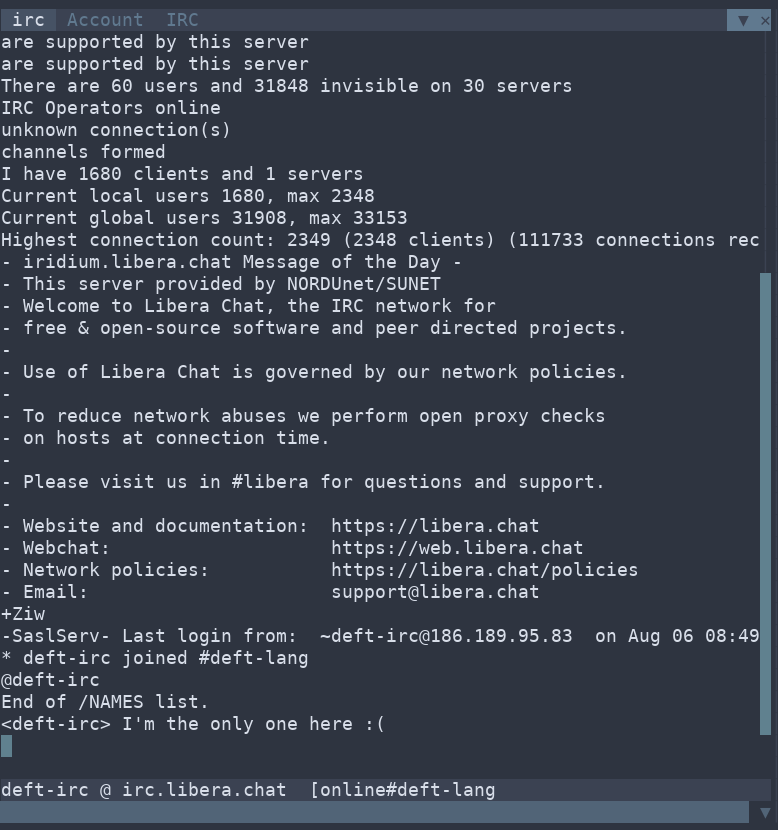
- IRC is IRC.
| Nostr | IRC |
| ----- | --- |
|
 |
 |
## Conclusion
Deft demonstrates a maturity and focus of vision which enables rich cooperation
between apps, catering for many use cases in a consistent flexible and fun way.
Imagine then as a sysadmin, adding your own panels to your app with an event
driven and declarative UI. Deft is very good for management panels, particularly
when you can drive multiple servers from different runtimes in the same deft
instance and monitor them over pubsub - remember each running in own thread,
each with it's own memory and interpreter. I've tried this out here ...
Above is the deft website and package manager running as child processes to a
parent control panel rendered in retra over ssh (in tuios), I'm not saying this
is a great way to do server management as OS control is probably a better
option, but in testing mode it's an interesting experiment - of how a parent
runtime can take advantage of monitoring child runtimes.
### retro (gl based, 54MB*)
retro is SDL3 based and you can run games (e.g. there is a Flappy demo). It has
the ability to run openGL apps (the cube demo) with sound at more or less 60FPS.
With the deep integration mentioned above, the Deft platform could be a great
teaching tool. It has a modern hybrid procedural/functional language and tools
for testing - even though we have AI I'm assuming we'll still need to learn the
basics.
#### Retro Media
The video app is implemented using FFI onto FFMPEG.
| Video | OpenGL |
| ----- | ------ |
|| |
#### Other Experimental Hosts
There is another experimental host, hydra, which allows a single hydra instance
to run apps in separate native windows/shells - i was thinking of omarchy when
creating this.
\* at time of writing
### Workspaces, Menus and Pies
Both retro/retra UIs feature workspaces to allow you to shape multiple panel
layouts. Drag and drop panels and groups of panels into new positions. Build
your new workspace from any panel using keys strokes or (from the 3d world) the
pie menu to split the current panel horizontally or vertically.
Menus and pies are defined in-app with a deft map.
#### Lockdown Mode
You may lock both retro/retra down to single panel apps, or certain workspace
configurations with varying degrees of workspace chrome.
## AI Generated Apps
Most of the Deft apps currently available were generated with AI. To be able to
create a new app in chat with "create an app with the following spec" and then
just load it and tweak it is a very useful feature. AI integration can be much
more pervasive in all apps going forward.
There is deep AI integration with providers as installable packages.
AI sessions are Sqlite backed.
Deft is MCP aware, and further multiple app @rpc can be added to the MCP roster
on demand using the Automate menu option, switch on the editor automation, and
it appears in the MCP tool roster ...
| Editor Automation | Roster |
| ----------------- | ------ |
| | |
The chat app needs a lot more work, but is moving in the direction of Deepseek's
"Everything is a plugin".
#### Sandbox
Given potential security issues with AI, Deft also has landlock sandbox baked in
to limit AI reach to the current deft working directory and declarative access
specification for required directories.
## Full I18n
Deft comes with a lang/ namespace to aid i18n within apps.
## Commercial Considerations
### AOT Bytecode Compilation
deft compile --app flappy
Creates the following
flappy
├── assets
├── bundle.dft
├── flappy.dftc
├── icon.svg
└── package.dft
All code bundled into the byte compiled flappy.dftc - all assets bundled to
assets/ directory.
The launcher finds and runs the app identically to the source version.
See AOT Compilation for the full workflow — compiling,
launching images in each host, bundle manifests, and semantics/limits.
### Lockdown Mode
Pin the workspace to a vendor launcher and an allow listed app set, or
run one full-bleed app with the `:chrome :app` single-app
presentation. See Lockdown for more info.
## Future
### Network Config/Delivery
Workspace/configuration delivery over the network, .i.e. consistent environment
downloaded to hosts.
Use cases:
- a teaching environment
- point of sales terminals
Note: Deft already has an SSH VFS, so saving data back to user homes already
possible
### Full Platform Coverage
Currently just Linux/RPI. Given Zig is the implementation language, providing
Windows/Mac coverage should be relatively straightforward. I'm prefer to work on
covering the basics on my native platform (Linux) before venturing forth.
3rd party interest in given platforms will focus my attention.
### Experimental Apps
I'm currently playing with sheets a new take on the spreadsheet, and codegraf.
I'll concentrate on codegraf for now as it has more practical platform
implications. Typically these applications serve to test the underlying
subsystems robustness and performance.
#### Codegraf
Codegraf is effectively like Blender's geometry nodes, which have been an
incredible addition to that platform; visualise data flows through the system
performing transformations on them, effectively it's writing a script. It seems
superfluous when you can "just write the script" but in the Blender ecosystem
it's provided great utility for many users. In a similar way codegraf can enable
same for Deft - maybe as an introduction to programming, simple scripting and
so on.
You can see we're running a sqlite query, filtering through a user defined
filter, counting the output of that list then inserting it into the sheet using
the sheets @rpc defined method set-cell. One can imagine libraries of these.
#### Email Client
In addition, I have a very early working prototype of an IMAP email client.
IMAP/SMTP implemented in Deft - again I'm mirroring Emacs style integration.
#### Other Network Clients
- Nostr is decentralised social media infrastructure.
- IRC is IRC.
| Nostr | IRC |
| ----- | --- |
| | |
## Conclusion
Deft demonstrates a maturity and focus of vision which enables rich cooperation
between apps, catering for many use cases in a consistent flexible and fun way.